> ## Documentation Index
> Fetch the complete documentation index at: https://docs.pressmaster.ai/llms.txt
> Use this file to discover all available pages before exploring further.
# Creating Content
> Pressmaster offers four creation modes, Brainstorm, Interview, Instant Creation, and Plan Ahead, each designed for a different starting point and output goal.
Every piece of content in Pressmaster starts from the **+ Create** button. From there, you choose a mode based on where you are and what you want to accomplish. All modes share a unified editor and connect to the same creation flow, from idea to publish in one unbroken session.
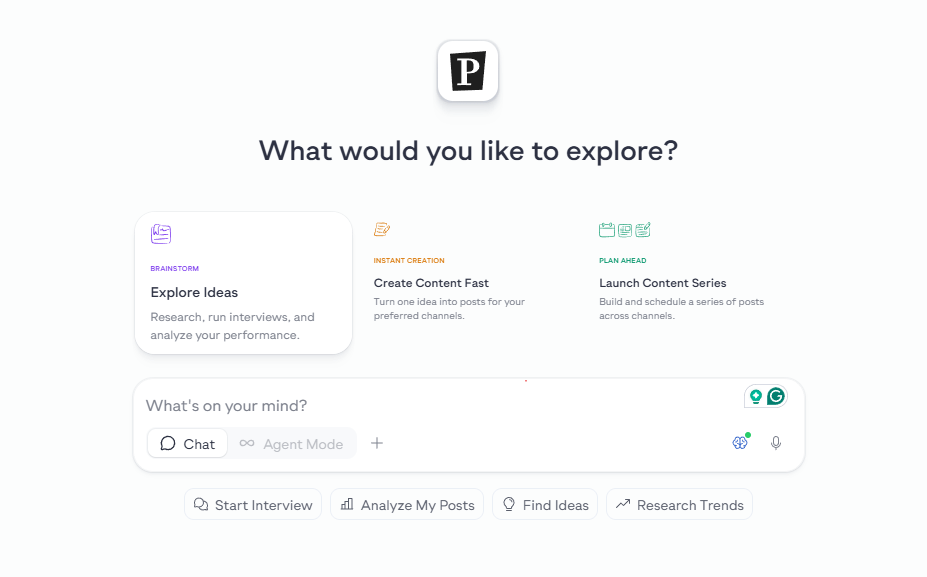 Chat with your content library, analytics, interviews, and the web. Develop strategy, then hand off to creation, no copy-pasting.
Run a text, voice, or video interview on any topic. Switch modes mid-session and turn any conversation directly into content.
Drop in an idea and get a ready-to-post piece, social posts, articles, newsletters, press releases, or video scripts.
Build a full content plan. Let Pressmaster handle it automatically, customize your own, or repurpose existing content.
## Which mode should you use?
| If you want to… | Use |
| -------------------------------------------------------- | ------------------------------- |
| Analyze what's working before deciding what to create | Brainstorm |
| Develop a rough idea before committing to a format | Brainstorm |
| Extract content from a conversation or your own thinking | Interview |
| Create one piece of content right now | Instant Creation |
| Plan and create a week or more of content | Plan Ahead |
| Repurpose an existing article, video, or file | Plan Ahead → Repurpose Content |
| Publish a quick post from inside a chat | Brainstorm → In-Chat Publishing |
## What happens after creation
All content you create, whether drafted, scheduled, or published, lands in your [Content Library](/content-library/overview). From there you can review, approve, reschedule, or publish any piece. Scheduled content also appears in your [Calendar](/calendar/overview).
Chat with your content library, analytics, interviews, and the web. Develop strategy, then hand off to creation, no copy-pasting.
Run a text, voice, or video interview on any topic. Switch modes mid-session and turn any conversation directly into content.
Drop in an idea and get a ready-to-post piece, social posts, articles, newsletters, press releases, or video scripts.
Build a full content plan. Let Pressmaster handle it automatically, customize your own, or repurpose existing content.
## Which mode should you use?
| If you want to… | Use |
| -------------------------------------------------------- | ------------------------------- |
| Analyze what's working before deciding what to create | Brainstorm |
| Develop a rough idea before committing to a format | Brainstorm |
| Extract content from a conversation or your own thinking | Interview |
| Create one piece of content right now | Instant Creation |
| Plan and create a week or more of content | Plan Ahead |
| Repurpose an existing article, video, or file | Plan Ahead → Repurpose Content |
| Publish a quick post from inside a chat | Brainstorm → In-Chat Publishing |
## What happens after creation
All content you create, whether drafted, scheduled, or published, lands in your [Content Library](/content-library/overview). From there you can review, approve, reschedule, or publish any piece. Scheduled content also appears in your [Calendar](/calendar/overview).