
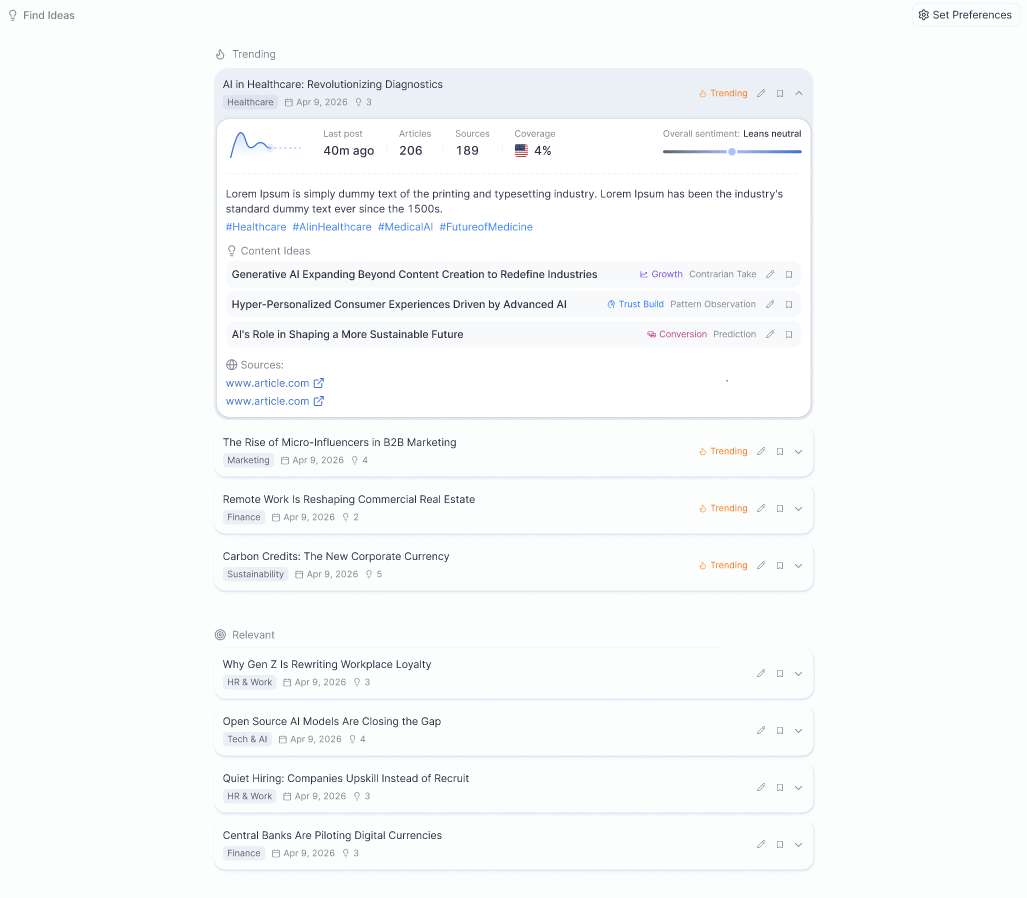
What Find Ideas does
- Spots emerging trends 3–4 weeks before they peak
- Delivers ready-to-use content angles customized for your expertise and brand
- Provides viral-optimized hooks based on analysis of 50,000+ successful posts
- Categorizes signals into Trending (real-time topics gaining traction) and Relevant (important, evergreen, or under-the-radar topics in your space)
Setting up Find Ideas
1
Open Set Preferences
Click Set Preferences in the Find Ideas section to begin configuration.
2
Choose your industry
Select up to three industries. Use the “Help me choose the right industry” feature for automated suggestions based on your expertise. Pick one or two industries that best reflect your focus, broader categories give you more discovery.
3
Set your region and language
Choose your geographic focus (Worldwide, North America, Europe, or a specific country) and your preferred language. North America and Global regions receive the highest news volume, giving you more signals to work with.
4
Add expertise keywords
Enter keywords that reflect your specific expertise areas, for example, “AI marketing” or “leadership.” Avoid overly narrow terms; broader keywords lead to better discovery. Leave the exclusions field empty unless you have specific topics to block.
5
Apply Preferences
Click Apply Preferences to activate Find Ideas. Allow 30–40 minutes for the initial trend analysis to complete. If no trending topics appear immediately, relevant signals will still be available, there is always content to work with.
Update frequency by plan
How to use trends to create content
Click any trending topic or relevant signal to see its summary, sentiment, and personalized content angles. Select the angle that fits your voice, then choose how you want to act on it:- Brainstorm, explore, research, and develop the idea through chat or interview
- Instant Creation, generate a ready-to-post article, social post, or press release immediately
- Plan Ahead, feed the trend into a broader content plan
- Interview, jump straight into a guided interview on the topic
- Save, save the trend to your Saved Ideas to act on later