
Setting up your account
1. Connect your social channels (+200 credits)
Go to Settings > Integrations and connect the social media accounts you want to publish to. Click Connect next to each platform and complete the authentication flow. Pressmaster supports LinkedIn, Twitter/X, Instagram, Facebook, and Bluesky. If you have a blog, connect it here too, WordPress, Ghost, Wix, Webflow, Blogger, or Medium. Once connected, Pressmaster can publish articles directly.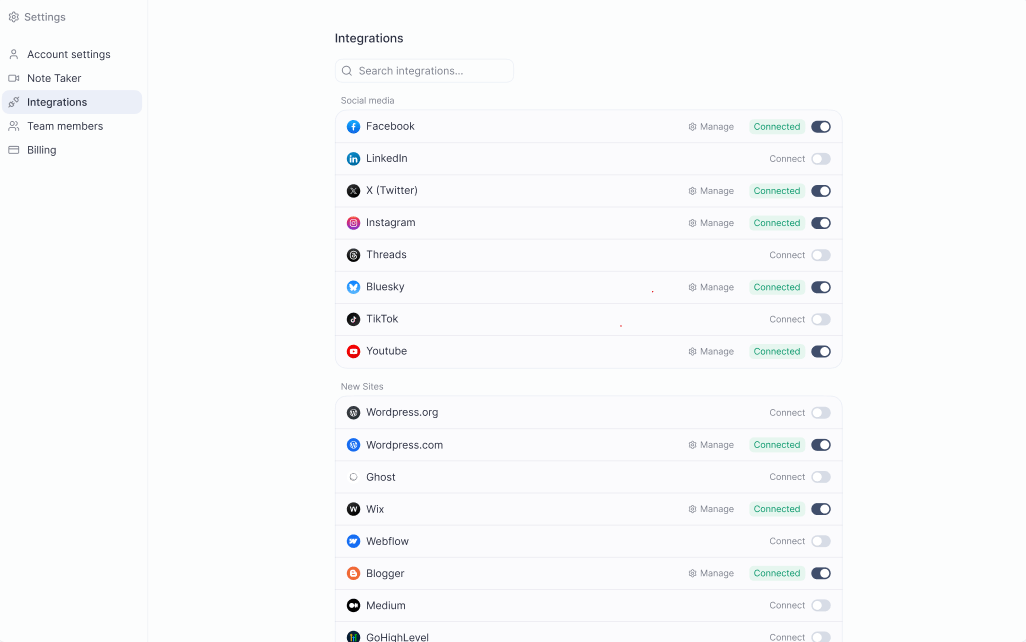
2. Set up your identity (+200 credits)
Go to IdentityOS to build the foundation of how Pressmaster understands you. There are four things to set up:- Brand Foundation, paste your website URL, answer a guided interview, or fill it in manually. Pressmaster builds your brand guide in minutes.
- Voice Profile, paste a piece of content you’ve written. Pressmaster analyzes your tone, structure, and rhythm, then applies it to everything it creates for you. Create one voice for social posts and one for long-form content for best results.
- Creative Director, upload images or design samples so Pressmaster matches your visual style for AI-generated images.
- Content Twin, your Twin is created automatically, but you’ll train it more deeply in step 4.
3. Activate your Super Agent (+1,000 credits)
Go to Agent Studio and activate your Super Agent. Once active, it runs in the background, monitoring your niche, planning content, and executing tasks autonomously so you don’t have to manage every step manually.4. Train your Twin and reach 100 IQ (+1,500 credits)
Go to IdentityOS and run your first training sessions. Your Content Twin maps your thinking, your stories, frameworks, opinions, and expertise, so Pressmaster creates content that genuinely sounds like you. Complete any of the guided trainings (Identity & Values, Story & Purpose, Expertise & Knowledge) or upload existing content you’ve written. Aim for a Twin IQ Score of 100 or above, that’s the threshold where the Twin is reliable enough to generate accurate, on-brand content without you needing to review every word.5. Publish your first 7 content pieces (+1,500 credits)
You’re ready to create. Choose your starting point from the + Create menu:- Instant Creation, drop in an idea and get a ready-to-post article or social post in minutes
- Brainstorm, chat with your data and interviews, develop a topic, then hand it off to creation
- Plan Ahead, let Pressmaster build a full content plan and create multiple pieces at once