
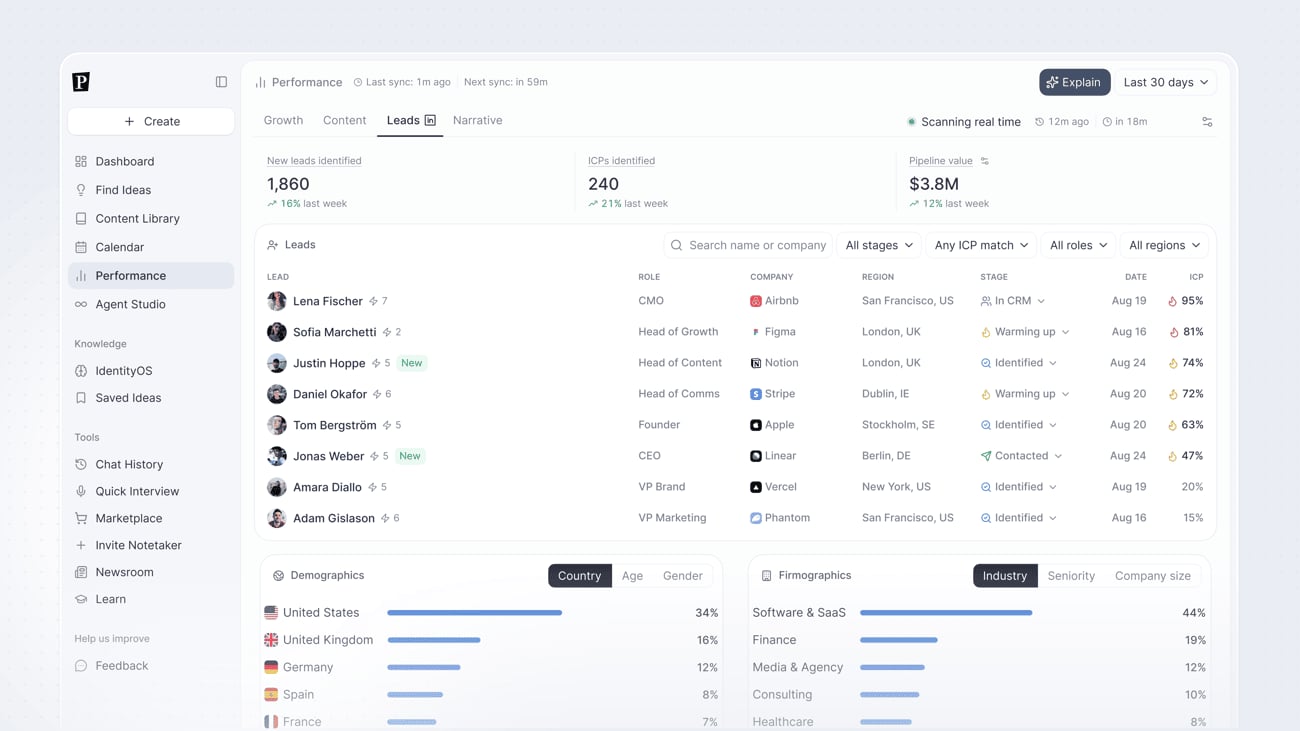
Top-line stats
- New leads identified, count of new leads found in the period
- ICPs identified, leads that match your ideal customer profile
- Pipeline value, estimated total deal value across your identified leads
Leads table
Every identified lead appears in a table with their role, company, region, pipeline stage, the date they were identified, and their ICP match percentage. Each lead also shows how many times they’ve engaged with your content. Search by name or company, or filter by stage, ICP match, role, or region.Pipeline stages
Leads move through stages as you or your agents work them:- Identified, Pressmaster has surfaced the lead but no outreach has started
- Warming up, initial engagement or outreach is underway
- Contacted, direct outreach has been sent
- In CRM, the lead has been pushed to your connected CRM
Demographics and Firmographics
Below the leads table, two breakdowns show who’s engaging with your content in aggregate:- Demographics, Country, Age, and Gender
- Firmographics, Industry, Seniority, and Company size
Push leads to your CRM
Connect a CRM through Agent Studio to automatically send identified leads to it, or let your agents follow up and contact them directly.Leads scan in real time. The tab shows your last sync time and a countdown to the next one, so you always know how current the data is.